Why Email Forwarders Are No Longer Reliable

For many years, email forwarding was considered a simple and convenient way to manage business communications. Companies could create professional email addresses such as info@yourcompany.com and automatically forward incoming messages to a Gmail, Outlook, or Yahoo inbox.

While this setup worked well in the past, it is becoming increasingly unreliable. Businesses are reporting missing emails, messages landing in spam folders, and important communications that never reach their intended recipients.

At Web World, we regularly help clients troubleshoot email delivery issues, and one common factor continues to emerge: traditional email forwarding is no longer the dependable solution it once was.

What Changed?

The email landscape has evolved significantly over the last few years. Major providers such as Gmail, Microsoft Outlook, and Yahoo have strengthened their security requirements to combat spam, phishing attacks, and email spoofing.

As a result, email authentication protocols now play a critical role in determining whether a message is delivered successfully.

The three most important authentication standards are:

  • SPF (Sender Policy Framework)
  • DKIM (DomainKeys Identified Mail)
  • DMARC (Domain-based Message Authentication, Reporting and Conformance)

These technologies help receiving mail servers verify that an email is genuinely sent by the domain it claims to represent.

Why Email Forwarding Causes Problems

When an email is forwarded, it passes through an additional mail server before reaching its final destination.

Although the message itself may be legitimate, the forwarding process can interfere with modern authentication checks.

SPF Failures
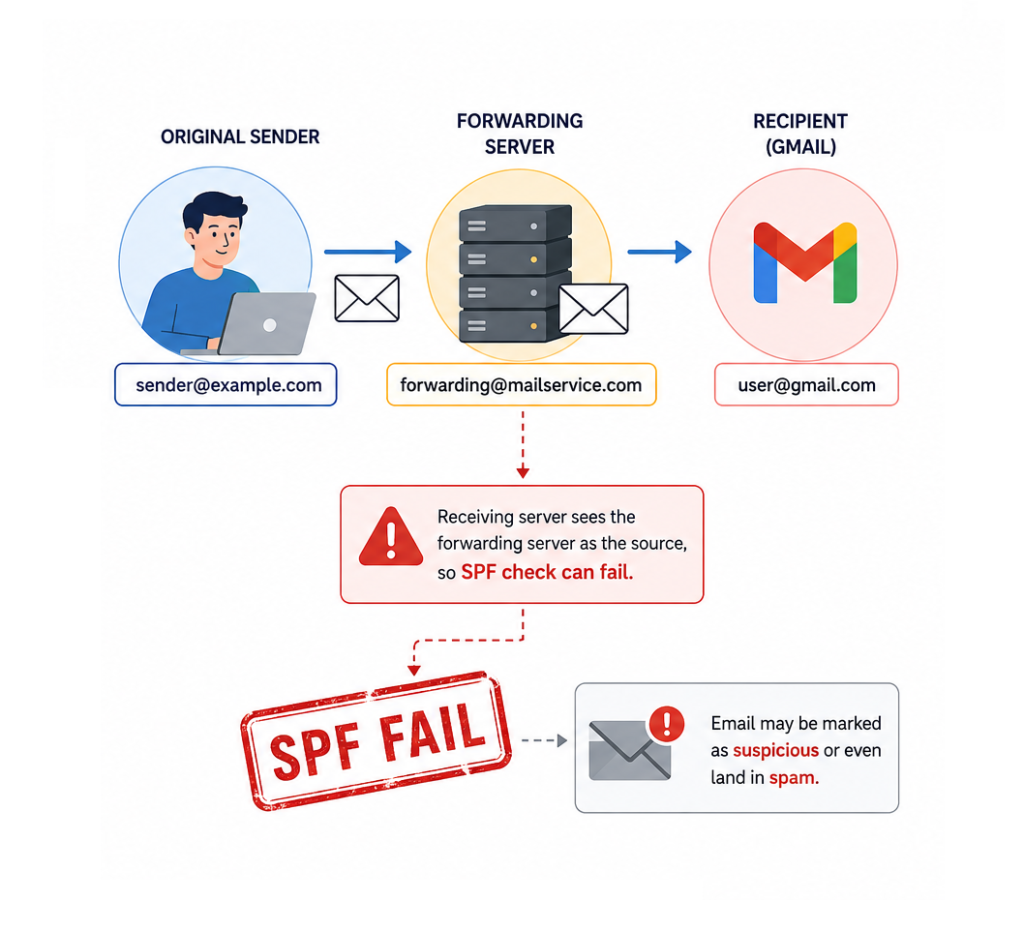
SPF records specify which servers are authorized to send email on behalf of a domain.

When a forwarded email arrives at Gmail or another provider, the receiving server may see the forwarding server—not the original sender—as the source of the message.

This can cause SPF validation to fail, making the email appear suspicious even though it originated from a trusted sender.

DKIM and Message Integrity

DKIM adds a digital signature to outgoing messages.

During the forwarding process, certain email headers may be modified. Even minor changes can sometimes affect the validation of the DKIM signature.

If both SPF and DKIM checks fail, the receiving server may reject the message entirely based on the sender’s DMARC policy.

Stricter Policies from Major Providers

Recent updates from Google and Yahoo have introduced stricter requirements for email authentication, especially for domains sending large volumes of email.

While these changes improve overall email security, they also expose weaknesses in older forwarding-based setups that many businesses still rely on.

The Risks for Businesses

Email delivery problems can have serious consequences.

A missed email could mean:

  • Losing a potential customer inquiry
  • Missing a quote request
  • Delaying support responses
  • Disrupting communication with suppliers or partners
  • Damaging customer trust

The most concerning aspect is that these failures often happen silently. Neither the sender nor the recipient may realize that a message was blocked or discarded.

Better Alternatives to Email Forwarding

1. Use Direct Mailbox Access

Instead of forwarding messages, consider accessing your business mailbox directly through webmail, desktop email clients, or mobile applications.

This approach preserves the original authentication chain and significantly improves delivery reliability.

2. Connect Your Mailbox to Gmail or Outlook via POP3 or IMAP

Many businesses prefer using Gmail or Outlook as their primary interface. Rather than forwarding messages, these platforms can retrieve email directly from your hosting account using POP3 or IMAP.

This method avoids many of the authentication issues associated with traditional forwarding.

3. Upgrade to a Professional Email Platform

Solutions such as Google Workspace and Microsoft 365 provide enterprise-grade email infrastructure, advanced security features, and improved deliverability.

For businesses that rely heavily on email communication, these platforms often provide the most reliable long-term solution.

4. Review Your Email Authentication Settings

Properly configured SPF, DKIM, and DMARC records are essential for modern email communication.

Regular audits of your domain’s email configuration can help identify issues before they impact business operations.

How Web World Can Help

Email systems have become far more complex than they were a decade ago. What worked perfectly in the past may now create hidden delivery problems that affect your business every day.

At Web World, we help businesses review their email infrastructure, improve email authentication, and implement modern solutions that ensure important messages reach their destination.

Whether you are experiencing delivery issues or simply want to future-proof your email setup, our team can help you choose the right solution for your business.

Final Thoughts

Email forwarding remains a convenient feature, but it should no longer be viewed as a guaranteed method of email delivery.

As email providers continue to strengthen security standards, businesses need to adapt by implementing modern email practices and authentication methods.

Taking action now can help prevent missed opportunities, improve communication reliability, and ensure your business remains connected to customers when it matters most.
Dirty Frag (CVE-2026-43284)

Dirty Frag (CVE-2026-43284): What you need to know.

On May 8, 2026, the Linux kernel project assigned CVE-2026-43284 to a vulnerability now being discussed publicly as Dirty Frag. Early public discussion describes it as a potentially broad Linux local privilege escalation issue, but the official NVD entry is more precise: the bug sits in the Linux kernel networking stack, specifically around ESP-in-UDP handling, splice-backed packet buffers, and shared skb fragments.

At the time of writing, NVD has published the record but has not yet assigned a CVSS score. Even so, kernel and security teams should treat this as a patch-priority issue because it involves kernel memory ownership assumptions and in-place modification of packet data.

The short version

Dirty Frag is caused by a mismatch in how the Linux kernel marks packet buffers that contain pages spliced from a pipe.

TCP already marks these buffers with SKBFL_SHARED_FRAG, warning later code that the skb contains shared fragments and must be copied before modification. Some IPv4 and IPv6 UDP datagram paths did not set the same flag when using MSG_SPLICE_PAGES.

That matters because ESP input processing can decrypt packet data in place. If an ESP-in-UDP packet is backed by shared pipe pages but is not marked as shared, the kernel may treat it like privately owned skb data and modify it directly.

In plain English: the kernel could decrypt into memory it did not privately own.

Why this is risky

Kernel networking code relies heavily on ownership rules: before modifying packet data, code needs to know whether the memory is private or shared. If that bookkeeping is wrong, security boundaries can start to blur.

The official NVD description says the vulnerable path leaves an ESP-in-UDP packet made from shared pipe pages “looking like an ordinary uncloned nonlinear skb.” ESP input then takes a fast path that avoids copy-on-write and decrypts in place.

That is the heart of Dirty Frag:

  • MSG_SPLICE_PAGES can attach pipe-backed pages directly to an skb.
  • TCP correctly marks these as shared fragments.
  • IPv4/IPv6 UDP datagram splice paths did not.
  • ESP input could therefore skip copy-on-write.
  • Packet data could be modified in-place even though the skb did not privately own the backing pages.

What was fixed

The Linux kernel fix does two things:

  1. Marks IPv4/IPv6 datagram splice fragments with SKBFL_SHARED_FRAG, matching TCP behavior.
  2. Makes ESP input fall back to skb_cow_data() when that flag is present, ensuring ESP does not decrypt externally backed fragments in place.

The NVD description also notes that ESP output was intentionally left unchanged because the problematic trailer-appending path is not reachable for nonlinear skbs in the same way.

Who should care

Prioritize investigation if you run:

  • Linux systems with untrusted local users
  • multi-tenant Linux environments
  • container or Kubernetes hosts where local kernel attack surface matters
  • systems using IPsec / ESP-in-UDP paths
  • environments that allow workloads to exercise advanced networking APIs

Even if exploitation requirements turn out to be narrower than early “universal LPE” language suggests, this is still kernel-space memory ownership logic. That puts it in the category of issues defenders should not ignore.

Detection and response

There is no simple log line that proves exploitation from normal system logs. Response should focus on exposure reduction and patch verification.

Recommended steps:

  1. Track vendor advisories for your distribution or kernel provider.
  2. Patch to a kernel containing the Dirty Frag fix as soon as packages are available.
  3. Prioritize shared and multi-user systems before single-user endpoints.
  4. Review workloads that rely on IPsec, UDP encapsulation, or high-performance splice/send paths.
  5. Limit untrusted local code execution where patching is delayed.
  6. Reboot after kernel updates unless your live-patching provider explicitly confirms coverage.

Current status

  • CVE: CVE-2026-43284
  • Nickname: Dirty Frag
  • Affected component: Linux kernel networking stack, ESP/UDP skb fragment handling
  • Published: May 8, 2026
  • CVSS: Not yet provided by NVD at time of writing
  • Fix direction: Mark UDP splice fragments as shared and require copy-on-write before ESP in-place decrypt

References

  • NVD: CVE-2026-43284
  • Openwall oss-security discussion: “Dirty Frag: Universal Linux LPE”
  • Linux stable kernel commits referenced by NVD

How to fix Dirty Frag CVE-2026-43284

Customers should treat Dirty Frag as a kernel update issue. The safest fix is to install a Linux kernel version that includes the upstream patches for CVE-2026-43284.

1. Check whether your system is affected

First, check the running kernel version:Copy

uname -r

Then compare it against your Linux vendor’s advisory for CVE-2026-43284.

Affected status depends on the kernel version and whether your distribution has already backported the fix.

2. Update the kernel

Install the latest kernel updates from your distribution.

For Debian or Ubuntu-based systems:Copy

sudo apt update
sudo apt upgrade

For AlmaLinux, RHEL, CentOS Stream or Rocky Linux: Copy

sudo dnf update kernel

For older RHEL/CentOS systems:Copy

sudo yum update kernel

For SUSE-based systems:Copy

sudo zypper update kernel-default

For Arch Linux:Copy

sudo pacman -Syu

3. Reboot into the patched kernel

Kernel updates usually do not fully take effect until the system has rebooted.Copy

sudo reboot

After rebooting, confirm the active kernel:Copy

uname -r

Make sure the running kernel is the updated version, not the old vulnerable one.

4. Prioritize exposed or multi-user systems

Patch these systems first:

  • shared hosting servers
  • Kubernetes and container hosts
  • VPN/IPsec gateways
  • systems with untrusted local users
  • developer workstations running untrusted code
  • internet-facing Linux infrastructure

5. If you cannot patch immediately

If an immediate kernel update is not possible, reduce exposure until patching can be completed:

  • restrict untrusted local shell access
  • avoid running untrusted containers or workloads
  • limit access to systems using IPsec or ESP-in-UDP where possible
  • apply vendor-recommended mitigations if provided
  • monitor distribution security advisories for temporary workarounds

These mitigations should be treated as temporary. They are not a replacement for patching.

6. Verify with your vendor

Because many enterprise Linux vendors backport security fixes without changing the major kernel version, do not rely only on upstream kernel version numbers.

Check the advisory from your OS vendor, for example:

  • Ubuntu Security Notices
  • Debian Security Advisories
  • Red Hat CVE database
  • SUSE Security Advisories
  • Amazon Linux Security Center
  • Oracle Linux Errata
  • distro-specific kernel changelogs

Bottom line

Dirty Frag is a reminder that small ownership flags in kernel networking code can carry big security consequences. The bug is not about flashy malware or a misconfigured service; it is about whether the kernel knows it owns the memory it is about to modify.

For defenders, the action is straightforward: watch your vendor advisory feed, patch affected kernels, reboot, and prioritize systems where untrusted users or workloads can reach kernel networking paths.

Two Critical Server Vulnerabilities You Need to Patch This Week

We’ve had two significant server vulnerabilities disclosed this week, and both warrant immediate attention from anyone running Linux servers or cPanel-based hosting.

What’s Been Disclosed

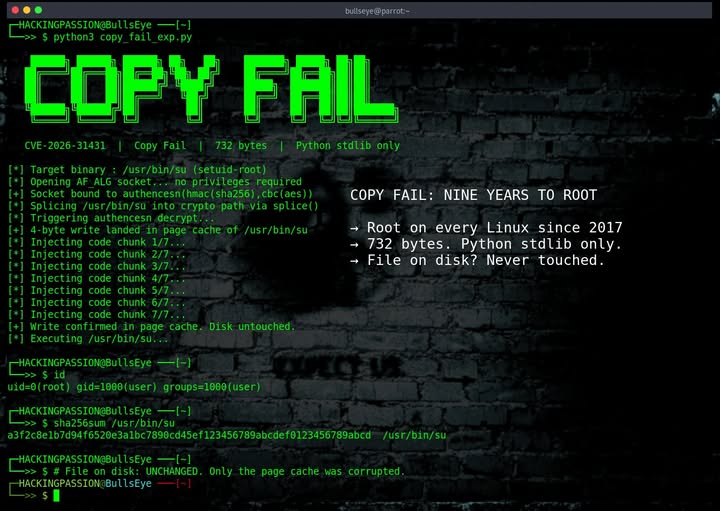
CVE-2026-31431 (“Copy Fail”) A flaw in the Linux kernel that could allow a local user to gain unauthorized root access. While it requires local access to exploit, on shared hosting environments or any server with multiple user accounts, this is a serious privilege escalation risk.

CVE-2026-41940 – A critical authentication bypass vulnerability in WHM/cPanel that could allow remote attackers to gain administrative access. This one is particularly nasty because it’s remotely exploitable, no prior access required.

Why This Matters

Most hosting environments in Ireland (and globally) run some flavour of Linux, and a huge portion of shared and reseller hosting sits on top of cPanel/WHM. That means these two CVEs together cover a substantial slice of the web hosting world.

If you manage your own server, VPS, or dedicated box, these are on you to patch. If you’re on managed hosting with us at WebWorld, we’ve already taken care of it across our infrastructure.

Are You Vulnerable to Copy Fail?

To make life easier, we’ve put together a free tool that lets you check whether your domain is running on a server that’s still exposed to the Copy Fail bug:

🔗 https://www.checkdomain.ie/copyfail/

Just enter your domain and we’ll do the rest. No login, no signup just a quick check.

How to Fix Them

For Copy Fail (CVE-2026-31431):
Update your Linux kernel to the latest patched version. On most distributions, that’s:Copy

# Debian/Ubuntu
sudo apt update && sudo apt upgrade -y
sudo reboot

# RHEL/CentOS/AlmaLinux/Rocky
sudo dnf update -y
sudo reboot

A reboot is required for the new kernel to take effect.

For the cPanel/WHM bug (CVE-2026-41940):
Simply update cPanel to the latest version. If you’ve got automatic updates enabled, you may already be patched, but it’s worth logging in and double-checking. You can run:Copy

/scripts/upcp --force

…from the command line as root to force an update immediately.

Need a Hand?

If you’re not sure whether you’re vulnerable, or you’d rather someone else handle the patching, get in touch. We can audit your server, apply the fixes, and verify everything’s locked down properly.

Warning About Fake Domain Renewal Emails From IDS Ireland

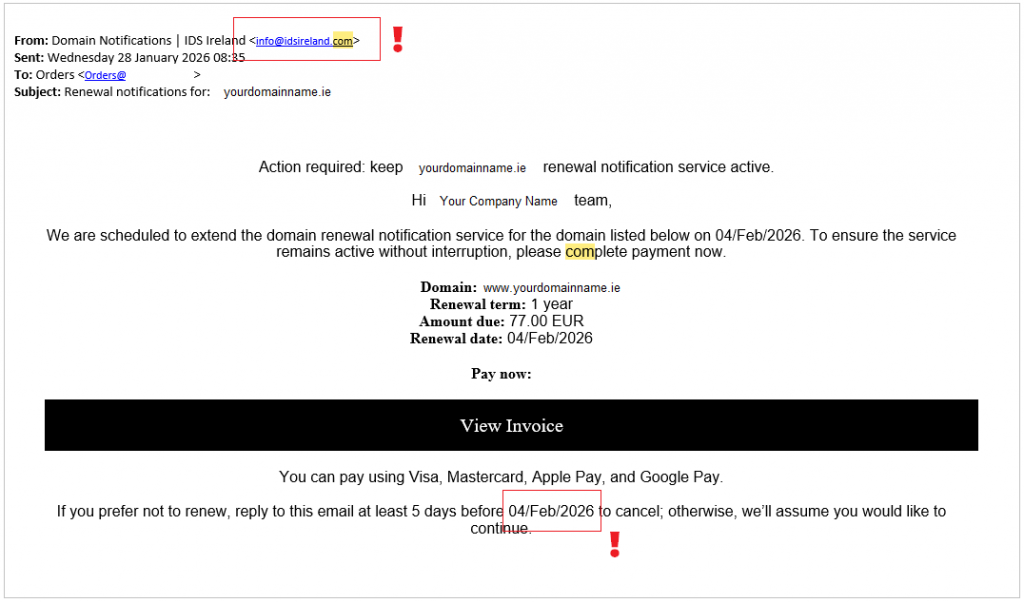
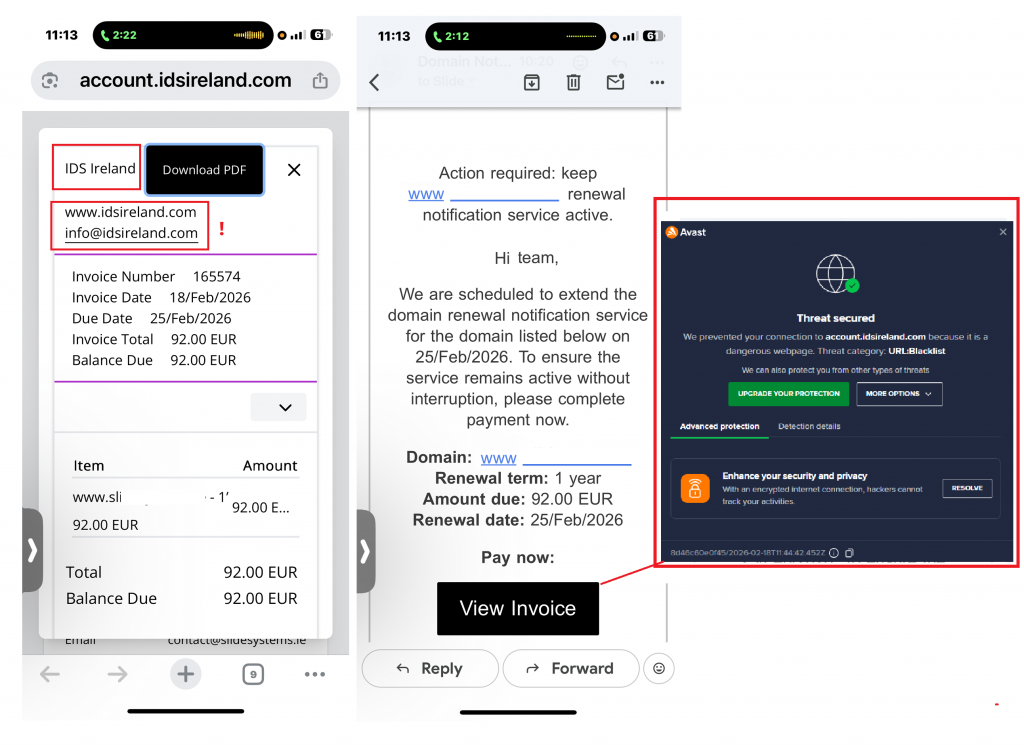
We’ve received numerous reports from clients about fraudulent domain renewal emails and invoices that appear to come from a company calling itself IDS Ireland. These messages try to look like legitimate renewal notices and urge immediate payment for a “domain renewal notification service.” They are not from us and are fraud.

How this scam works

  • Scammers send an email that looks like an invoice or renewal notice from IDS Ireland (info@idsireland.com or similar).
  • The message claims to be an official renewal for your domain and asks you to click a link or press a “View Invoice / Pay now” button.
  • The price quoted is often much higher than a normal renewal (we’ve seen amounts around €72–€92), and the goal is to get payment details or trick you into paying a fraudulent invoice.

How to spot a fake renewal email

  • Sender should be accounts@webworld.ie. If the message comes from any other address (for example info@idsireland.com), treat it as suspicious.
  • Unexpected invoice or unfamiliar company name. If you didn’t request a service, be suspicious.
  • High price compared with normal renewal costs. Scammers often charge multiple times the usual fee.
  • Urgency to pay now. Pressure to act quickly is a red flag.
  • Links that don’t match our website. Hover over links (without clicking) to check destinations.
  • Generic greetings or incorrect account details. Legitimate notices usually reference your account and control panel.

What to do if you receive one of these emails

1. Do not click any links or buttons.

2. Do not reply to the message. Replies can confirm your address is active.

3. Check your domain status directly by logging into your registrar account (do not use links in the email).

4. Forward the suspicious email to our support at support@webworld.ie and include the original message as an attachment or forwarded email.

5. Mark the email as spam or phishing in your email client.

6. If you already clicked a link but did not enter payment details, change any passwords you may have used and monitor accounts for suspicious activity.

7. If you entered payment details or paid, contact your bank or card issuer immediately to report potential fraud and request a charge dispute.

Who are IDS Ireland?

This is a fake company, it is not registered with the CRO in Ireland.

The domain idsireland.com was registered on the 1st of September 2024. However they have been opperatig for at least 7 years under diffent names including:

idseu.org
idsireland.org
idsmail.org
idsus.org
drnsbulgaria.org
drnsdenmark.org
drnsfinland.org
drnssk.org
drnssweden.org
drnsuk.org

The address on their website is 31-36 Ormond Quay Upper, Dublin, D07 EE37, which is a virtual office and essentially a mail forwarding service. They are using this virtual address in an attempt to look local.

Final Thoughts

Domain renewal scams like this are becoming more common and increasingly convincing. Scammers often use real WHOIS data (domain names and contact details from public sources) to make their messages look truthful and relevant, but that doesn’t mean they actually manage or control your domain.

If you receive a notice about your domain:

  • Always check directly with your actual registrar, log into your account instead of clicking links in the email.
  • Never pay an invoice from a company you don’t recognise. Your domain can only be renewed through the registrar you originally used.
  • Scammers rely on urgency and fear to get you to act without verifying the details, take a moment to double‑check first.

In short: stop, verify, and don’t pay until you are absolutely sure the request is genuine. If in doubt, contact your registrar or web support team before taking any action. If you have any questions please contact: support@webworld.ie

cPanel vs. DirectAdmin: Two Leading Web Control Panels

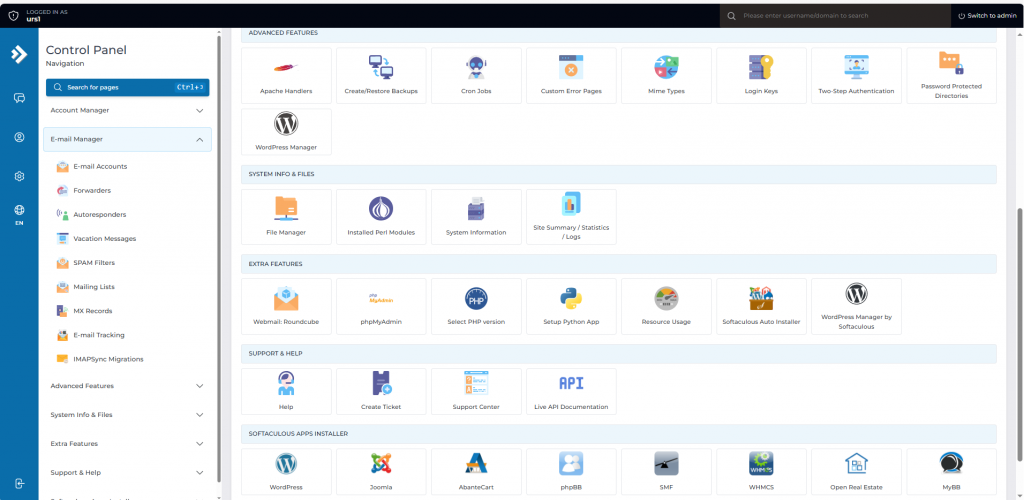
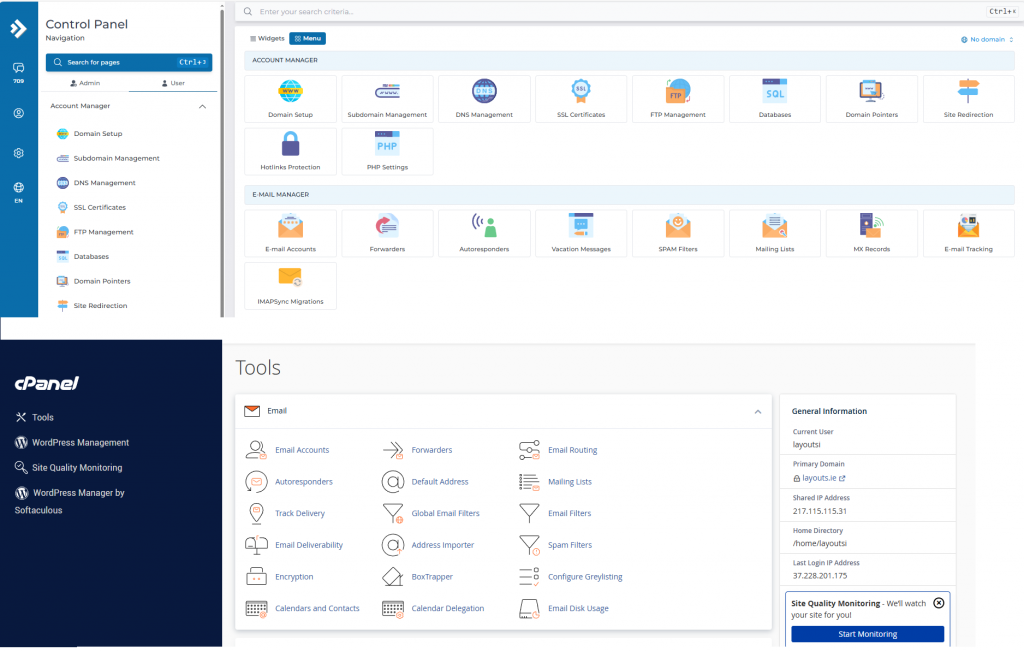
cPanel and DirectAdmin are popular web hosting control panels designed to simplify server management. Both offer essential tools for managing domains, emails, databases, and security, delivering similar core functionality to streamline administrative tasks. This article explores their key similarities to help you understand how they achieve the same goals.

Two leading web hosting control panels discover how cPanel and DirectAdmin both serve the same purpose with strength and style.

When it comes to web hosting control panels, cPanel is often seen as the industry standard. It’s been around for decades and is widely known for its user-friendly interface and robust features. However, DirectAdmin has emerged as a powerful and reliable alternative, especially in recent years.

Key Similarities Between DirectAdmin and cPanel

1. User-Friendly Interface

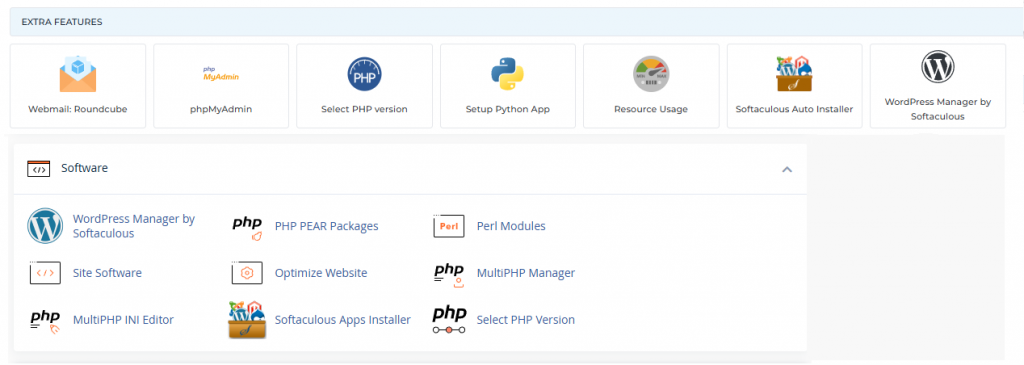
Both cPanel and DirectAdmin offer clean, intuitive dashboards. Users can manage domains, email accounts, databases, backups, and files with just a few clicks. While the layout may differ slightly, the functionality is nearly identical.

2. Comprehensive Hosting Management

Whether you’re a beginner or an experienced sysadmin, both panels provide complete control over your hosting environment. You can:

  • Create and manage multiple websites
  • Set up email accounts and forwarders
  • Handle FTP and file management
  • Configure DNS settings
  • Install SSL certificates

3. Support for Popular Software

DirectAdmin and cPanel both support:

  • Apache and Nginx web servers
  • MySQL/MariaDB
  • PHP versions management
  • Softaculous (or similar 1-click app installers)
    This ensures compatibility with most modern websites, including WordPress, Joomla, Magento, and more.

4. Security Features

Both platforms offer:

  • Two-factor authentication (2FA)
  • IP blocking
  • Brute-force attack prevention
  • SSL management
  • Firewall and antivirus integration
    Security is a top priority on both sides.

5. Multiple Access Levels

Each has three main user roles:

  • Admin: Full system access
  • Reseller: Can manage multiple user accounts
  • User: End-client or site owner access
    This makes either option suitable for shared hosting providers or web agencies.

Why DirectAdmin Is Just as Good as cPanel

Lightweight and Fast. DirectAdmin is known for being lightweight and resource-efficient. It performs exceptionally well even on low-resource servers, making it ideal for VPS environments.

Cost-Effective. Following cPanel’s price increases in recent years, many users began looking for alternatives. DirectAdmin offers a more budget-friendly licensing model while still delivering premium-level features.

Active Development and Support. DirectAdmin continues to evolve with regular updates, new features, and excellent support. Its community is active, and many hosting providers have shifted toward supporting it.

Customization and Scripting.DirectAdmin provides flexibility for advanced users through custom scripting and API access, similar to what you’d find with cPanel/WHM.

Migration Tools. Moving from cPanel to DirectAdmin is easier than ever. Migration tools are available that help you transfer accounts, emails, databases, and settings with minimal hassle.

Cost Efficency

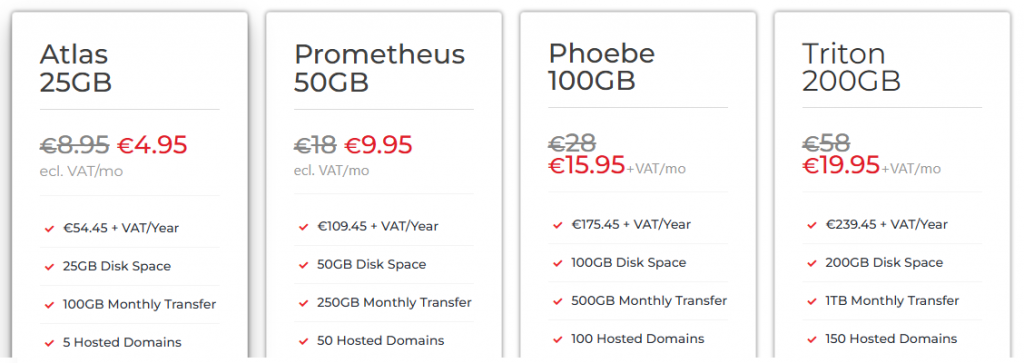
When it comes to cost efficiency, DirectAdmin hosting stands out as a smarter choice for individuals and businesses alike. Unlike other control panels that come with hefty licensing fees, DirectAdmin offers a lightweight, budget-friendly solution without compromising on functionality. This means lower monthly costs for hosting providers and more affordable plans for customers. At Web World Hosting, our DirectAdmin-based web hosting is optimized for speed, simplicity, and reliability—making it ideal for startups, developers, and small business owners who want premium features without the premium price tag. With intuitive controls, fast performance, and fewer overheads, DirectAdmin helps you get more value for your investment.

Conclusion

While cPanel remains a powerful and popular choice, DirectAdmin matches it in functionality and usability—and even surpasses it in some key areas like performance and pricing. Whether you’re managing a single website or running a full hosting business, DirectAdmin is a robust, secure, and scalable solution that deserves serious consideration.

If you’re looking for a control panel that delivers without breaking your budget, DirectAdmin is just as good as cPanel—if not better for many use cases.

Why 2FA Is Critical for Hosting Panels

When it comes to website security, your hosting control panel is the gateway to everything—your files, databases, emails, and settings. Whether you’re using cPanel or DirectAdmin, enabling Two-Factor Authentication (2FA) adds a powerful layer of protection against unauthorized access.

In this post, we’ll walk you through enabling 2FA on both platforms and explain why it’s a must for every website owner.

MORE >>

Why Paying Less for .NL Domains Just Makes Sense

Registering your .NL domain with Web World ensures long-term value, transparent pricing, and significant cost savings—up to 45% less compared to providers like TransIP. While others advertise low first-year rates followed by steep renewals, Web World offers a stable, predictable pricing structure with no hidden fees. Whether you’re managing a single domain or an entire portfolio, Web World provides a smarter, more sustainable choice for businesses and individuals alike.

MORE >>

Elevate with Your .NL Domain

Empower Your Online Presence: Unleash the Influence of Country-Specific Domains, Elevating Your Website’s Popularity and Signifying its Purpose. From Ireland’s .ie to the UK’s .uk and the Netherlands’ chic .nl – Amplify Your Connection with Local Audiences, Instilling Trust and Confidence in Your Digital Identity

MORE >>